JavaFX | CustomMenuItem
CustomMenuItem является частью библиотеки JavaFX. CustomMenuItem позволяет использовать различные типы узлов в качестве пункта меню. Одно из полезных свойств customMenuItem - hideOnClick. Это свойство указывает, должно ли меню быть скрыто, когда пользователь щелкает элемент меню или нет.
Конструкторы CustomMenuItem:
- CustomMenuItem (Node n) : создает элемент меню с указанным узлом
- CustomMenuItem (Node n, boolean b) : создает элемент меню с указанным узлом и скрывает при щелчке свойство
Обычно используемые методы:
метод объяснение getContent () получает значение содержания свойства isHideOnClick () получает значение свойства hideOnClick setHideOnClick (логическое v) устанавливает значение свойства hideOnClick setContent (узел v) устанавливает узел в качестве содержимого для пункта меню
Below programs will illustrate the use of CustomMenuItem:
- Program to Create a custom menu items and add it to the menu: This program creates a menubar indicated by the name menubar. A menu will be created by name m and 3 custom menuitems menuitem_1, menuitem_2, menuitem_3 will be added to the menu and the menu will be added to the menubar. The menubar will be created inside a scene, which in turn will be hosted inside a stage. The function setTitle() is used to provide a title to the stage. Then a VBox is created, on which addChildren() method is called to attach the menubar inside the scene. Finally, the show() method is called to display the final results. The Custom MenuItems will contain a button, label, and a checkbox.
Java
// Program to create a custom menu items and add it to the menuimport javafx.application.Application;import javafx.scene.Scene;import javafx.scene.control.*;import javafx.scene.layout.*;import javafx.event.ActionEvent;import javafx.event.EventHandler;import javafx.collections.*;import javafx.stage.Stage;import javafx.scene.text.Text.*;import javafx.scene.paint.*;import javafx.scene.text.*;public class CustomMenuItem_1 extends Application { // Launch the application public void start(Stage stage) { // Set title for the stage stage.setTitle("creating CustomMenuItem "); // Create a tile pane TilePane r = new TilePane(); // Create a label Label description_label = new Label("This is a CustomMenuItem example "); // Create a menu Menu menu = new Menu("Menu"); // Create menuitems CustomMenuItem menuitem_1 = new CustomMenuItem(new Button("MenuItem 1")); CustomMenuItem menuitem_2 = new CustomMenuItem(new Label("MenuItem 2")); CustomMenuItem menuitem_3 = new CustomMenuItem(new CheckBox("MenuItem 3")); // Add menu items to menu menu.getItems().add(menuitem_1); menu.getItems().add(menuitem_2); menu.getItems().add(menuitem_3); // Create a menubar MenuBar menubar = new MenuBar(); // Add menu to menubar menubar.getMenus().add(menu); // Create a VBox VBox vbox = new VBox(menubar); // Create a scene Scene scene = new Scene(vbox, 200, 200); // Set the scene stage.setScene(scene); stage.show(); } public static void main(String args[]) { // Launch the application launch(args); }} |
- Output:
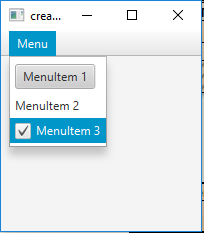
- Program to create custom menu items and add it to the menu and use the property hide on click: This program creates a menubar indicated by the name menubar. A menu will be created by name m and 4 custom menuitems menuitem_1, menuitem_2, menuitem_3, menuitem_4 will be added to the menu and the menu will be added to the menubar. The menubar will be created inside a scene, which in turn will be hosted inside a stage. The function setTitle() is used to provide a title to the stage. Then a VBox is created, on which addChildren() method is called to attach the menubar inside the scene. Finally, the show() method is called to display the final results. The CustonMenuItems will contain a button, a slider, a checkbox, and a choicebox. The hide on click property of custom menuitems_2 and menuitems_4 will be set to false and of menuitem_1 and menuitems_3 will be set to true. On Clicking on menuitem_2 and menuitem_4 will not disappear on clicking.
Java
// Program to create custom menu items and// Add it to the menu and use the property hide on clickimport javafx.application.Application;import javafx.scene.Scene;import javafx.scene.control.*;import javafx.scene.layout.*;import javafx.event.ActionEvent;import javafx.event.EventHandler;import javafx.collections.*;import javafx.stage.Stage;import javafx.scene.text.Text.*;import javafx.scene.paint.*;import javafx.scene.text.*;public class CustomMenuItem_2 extends Application { // Launch the application public void start(Stage stage) { // Set title for the stage stage.setTitle("creating CustomMenuItem "); // Create a tile pane TilePane r = new TilePane(); // Create a label Label description_label = new Label("This is a CustomMenuItem example "); // Create a menu Menu menu = new Menu("Menu"); // Create menuitems CustomMenuItem menuitem_1 = new CustomMenuItem(new Button("MenuItem 1")); CustomMenuItem menuitem_2 = new CustomMenuItem(new Slider()); CustomMenuItem menuitem_3 = new CustomMenuItem(new CheckBox("MenuItem 3")); CustomMenuItem menuitem_4 = new CustomMenuItem(new ChoiceBox(FXCollections .observableArrayList("choice 1", "choice 2", "choice 3"))); // Cet hide on click property menuitem_2.setHideOnClick(false); menuitem_4.setHideOnClick(false); menuitem_1.setHideOnClick(true); menuitem_3.setHideOnClick(true); // Add menu items to menu menu.getItems().add(menuitem_1); menu.getItems().add(menuitem_2); menu.getItems().add(menuitem_3); menu.getItems().add(menuitem_4); // Create a menubar MenuBar menubar = new MenuBar(); // Add menu to menubar menubar.getMenus().add(menu); // Create a VBox VBox vbox = new VBox(menubar); // Create a scene Scene scene = new Scene(vbox, 200, 200); // Cet the scene stage.setScene(scene); stage.show(); } public static void main(String args[]) { // Launch the application launch(args); }} |
- Output:
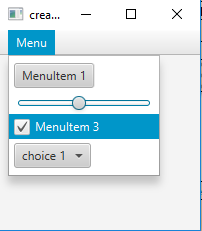
Примечание. Указанные выше программы могут не работать в сетевой среде IDE. Используйте автономный компилятор.
Ссылка: https://docs.oracle.com/javafx/2/api/javafx/scene/control/CustomMenuItem.html
Вниманию читателя! Не переставай учиться сейчас. Ознакомьтесь со всеми важными концепциями Java Foundation и коллекций с помощью курса "Основы Java и Java Collections" по доступной для студентов цене и будьте готовы к работе в отрасли. Чтобы завершить подготовку от изучения языка к DS Algo и многому другому, см. Полный курс подготовки к собеседованию .